 DBXanalyzer
DBXanalyzer
DBXanalyzer
DBXanalyzerTM reads, analyses and manages email data files created by Microsoft Outlook Express 5 and 6.
Do you want a way to manage and read the DBX files created by Microsoft
Outlook Express?
Is your Inbox becoming too large?
Do you want to access old emails from another system or from your backups?
DBXanalyzer from DI Management Services allows you to read, analyse and export your emails from any DBX file created by Microsoft Outlook Express versions 5 and 6.
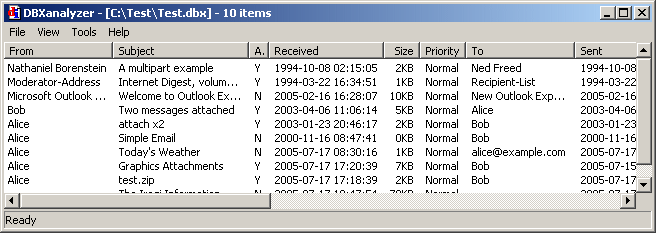
The DBX file does not have to be a current one - it can be an archived copy from your backup, or one from a different computer. DBXanalyzer does not replace your Outlook Express (OE) email client, nor does it alter or change your existing DBX files; rather it enables you to backup, manage and restore the emails in its message store. If you don't know what a DBX file is or how OE stores your emails, read on...

What users have to say about DBXanalyzer:
“ Just to say I am well pleased with DBXanalyzer A great time saver, when it comes to archiving old emails, no longer need to sift and sort before backing up, DBXanalyzer does it for me, and I can find what I need when I need it. Thanks for a great program ”
- G.Collins.
“ I like the straight forwardness and no frills approach of your program. No IT support person should be without it. It is also great for backup purposes because one can just copy the dbx files to any other location and access them later via your prg. Good stuff :-) ”
- Thinus.
“ What a fantastic piece of software dbxanalyzer is. I used it today to retrieve an old password from an e-mail buried in a ghost backup of a destroyed hard drive. Windows outlook express was useless for the task. Again, Fantastic. ”
- Dave.
“ I recently licensed DbxAnalyzer and I'm delighted with it. I have several gigabytes of email in Outlook Express 6 (built up over 10 years) and it is the first program or export / import mechanism not to hang when trying to extract the data. ”
- Ian.
“ I receive a lot of email and keep them backed-up to CDs. This program makes it much easier for me to search for emails from a particular sender or a certain subject. ”
- Joe.
“ Saved my email sole ! ”
- Roly.
“ I wish to express my gratitude for the fine piece of software you made. DBXanalyser saved me lots of time since the day I bought it. ”
- Jean.
“ Fantastic, you saved me so much time moving from a broken machine ”
- Ian.
“ I used the trial for only a few minutes and found this product to be exactly what I wanted. Thank you! ”
- F.C.
“ DBXanalyzer is the best .DBX file management program I have used to date. I have used several. ”
- John.
“ Hot puppies !!!! It WORKS !!! I got my mail back !!!! ”
- Justine
Thanks to Ronn Andreasen, Inseo Park and Mike DeAngelo for their helpful suggestions.
DBXanalyzer has a small footprint (under 200kB for DBXanalyzer, DBXcmd and MIMEanalyze combined). It works on all 32-bit Windows platforms 95/98/Me/NT4/2K/XP/2003/Vista/W7/W8. You do not even need to have OE installed to use it.
2009-12-28: All executables in version 1.9.4 have been re-compiled using MSVC++ 9.0 (VS2008) and tweaked using Cloanto's Legacy Extender so they will work on W9x systems. Earlier versions were all compiled using the good old faithful MSVC++5.0, which has served us well for 12 years or so, and which produced executables that ran without problems on any Win32 system from W95 through to the latest W7. The only reason we have "upgraded" to MSVC9 is because MSVC5 won't work on Vista and above and our main XP machine died (along with our W95 test machine - is there a hint here?).
2014-05-31: The Licensed version of DBXanalyzer is now available for free. Download the zipped install file (367 KB). Unzip the file and double-click on Setup.exe to install.
Please read the licence conditions before installing. If you do not agree with these terms and conditions, DO NOT INSTALL OR USE THE SOFTWARE.
DBE3-F41B-1917
Use the Analyze option to see the structure of an email message, including attachments. Use the Detach option to create a file copy of the attachment. Use View to see the raw data as stored in the email text (graphics and binary attachments will display in the raw base64-encoded format). Use Open with App to open the attachment with the default application on your system.
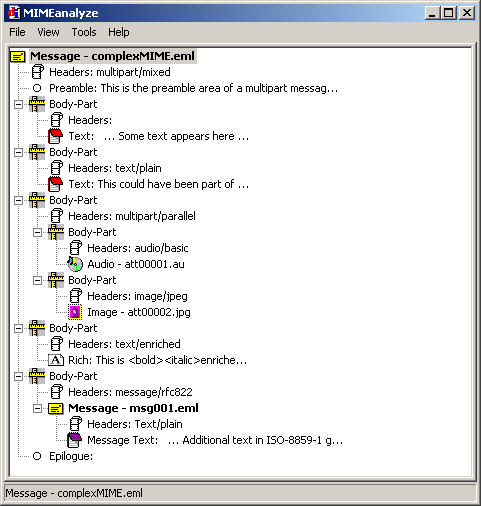
MIMEanalyze classifies the following MIME part types:-
 | Attached email (EML) message |
 | Attachment |
 | Text |
 | Binary |
 | Video |
 | Audio |
 | HTML |
 | Richtext (RFC 1341) |
 | Image |
 | Secure (PKCS) part |
 | Headers |
 | Encapsulated body part |
 | MIME preamble and epilogue |
DBXanalyzer is now shipped with DBXcmd, a command-line utility that can be called from the command line (aka the MS-DOS prompt) or from a batch file. You can use DBXcmd to create a list of messages in your specified DBX file in a variety of formats, including CSV format, or you can export the messages as a set of EML (TXT) files with unique filenames.
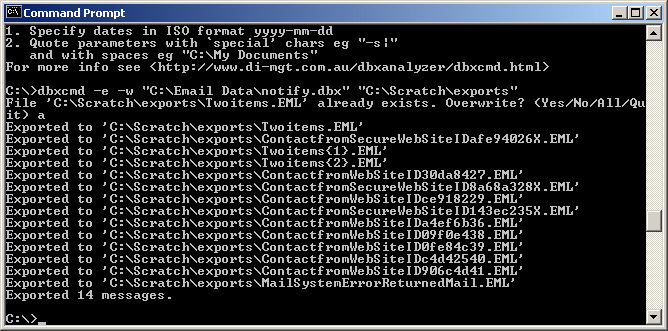
Update 17 February 2009: We added an extra option to DBXcmd to enable you to export messages in a useful manner. See Using in a Batch File - Number 2.
For more details and examples, see DBXcmd command-line utility.
| Program | Description | Included in DBXanalyzer download |
|---|---|---|
| DBXanalyzer | GUI-based program | Yes |
| DBXcmd | Command-line program (more details) | Yes |
| MIMEanalyze | GUI-based program called with Analyze option in DBXanalyzer | Yes |
View the DBXanalyzer help file (zipped, 44 kB).
There is no support whatsoever for this free product. If it works for you, fine, please use it. If you have a problem, please read the help manual above or look at the questions and answers in techniques below.
This section describes useful techniques for using DBXanalyzer in question and answer format. 'OE' means Microsoft Outlook Express.
Question: How does OE store my emails?
Answer: OE stores your emails in a proprietary database format called DBX. Each folder in 'Local Folders' has a corresponding file called Inbox.dbx, Sent Items.dbx, and so on. If you create your own folder called, say, 'myfolder', then OE will create a file called myfolder.dbx. DBXanalyzer allows you to read these DBX files and extract the emails from them.
Question: What is a DBX file?
Answer: A DBX file is a proprietary database format in which OE stores the emails it has sent and received.
Question: What is an EML file?
Answer: An email message is always a simple ASCII text file. An .EML file is a Microsoft extension
used to denote an email file; thus myemail.eml is an ASCII text file as received by your
email client, and OE will open it by default. Even though it may appear that this is a proprietary file
created by Microsoft Corporation, it is not. The file is still a simple ASCII text file that can be read
by Notepad or any other text editor. It could equally well have a .TXT extension.
However, an email stored inside an OE DBX file is stored in a proprietary format. You can export EML files directly from OE by dragging-and-dropping the message onto the desktop. DBXanalyzer will allow you to read and decode these proprietary files. Use the Tools - Export or Tools - Export All options to export individual emails as non-proprietary .EML or .TXT files.
Question: How can I organise and analyse my ever-expanding OE 'Inbox' and 'Sent Items' folders?
Answer:
inbox.dbx or Sent Items.dbx to another directory. You may want to
rename it, say, to inbox_01_2003_to_06_2003.dbx so you know what it contains.
Question: How can I retrieve emails from backups of my email data folder?
Answer:
Question: How can I copy an email from an archived DBX file into my current OE folders?
Answer:
If you double-click on the EML file in Windows Explorer, it should open anyway in OE.
Question: Where is my OE message store?
Answer:
This folder will contain all your current DBX files. By default* it is usually something simple like
C:\Documents and Settings\myname\Local Settings\Application Data\Identities\{4733BCCD-0BAA-3FAF-B3C4-4E542A79DF7C}\Microsoft\Outlook Express.
If you select Cancel at this stage, there will be no change.
It is recommended that you change this to something more useful like C:\EmailData
and then make sure you back up this folder frequently. Use
DBXanalyzer
to recover messages from your DBX
backup files.
* Note: the default OE message store location is usually hidden unless you set Windows Explorer to show hidden folders. To do this:-
Question: Can I export several files at once?
Answer: Yes. Hold down the Ctrl key while clicking on files in the list. This will select as many files as you want. Alternatively, hold down the Shift key and this will select all files between the previous selection and the current one. Use 'Export' or 'Export All' to export these files to non-proprietary EML files.
Question: What is the difference between 'Export' and 'Export All'?
Answer: 'Export' will ask you to confirm the filename for every file you export. 'Export All' will only ask you once; then it will just export all the remaining files you have selected to the same directory using the default unique name. Export to an empty folder to ensure no existing files are over-written.
Question: Can I export all my email files at once?
Answer: Yes. Select Tools - Select All or press Ctrl-A and then Tools - Export or Tools - Export All. (Hint: 'Export All' is simpler.) This will export all the messages as individual non-proprietary EML text files. DBXanalyzer will assign a name to each file that is unique for the set of messages that are being exported at one time. If you export all the messages to a new, empty directory, you are guaranteed that all the files will have a unique name. This does not happen with OE.
Question: How do I get a copy of an attachment in an email?
Answer: Select the message in the DBXanalyzer list and choose Tools - Analyze (or right-click on the message and select Analyze). This will open the file in our MIMEanalyze program. MIMEanalyze displays all the separate parts of the MIME file. Attachments are shown in bold. Select the attachment you wish to detach, right-click and select Detach.
Question: Can I use it in a batch file or with the Windows scheduler??
Answer: Use the command-line utility DBXcmd (new in Version 1.7). DBXcmd is a separate program called via the command line (i.e. in MS-DOS mode). You can create a list of messages in a variety of formats or export the messages in EML (TXT) format to a target directory. You can call the utility from a batch file or have the Windows Scheduler run the batch file every night, for example, to backup certain messages from your DBX files. For more details and examples see DBXcmd command-line utility.
Question: Can I search in several DBX files at once?
Answer: Yes. Use the Find in Files option in DBXanalyzer. This option (now improved in version 1.8) allows you to search all DBX files in a given folder.
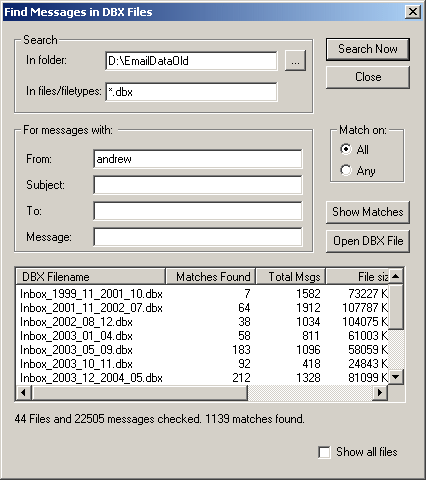
See the help manual for more details.
Question: Why do I get 'No messages found' or 'Unexpected type byte [c6]' errors?
Answer:
There are some DBX files that don't contain emails.
Examples include Folders.dbx, Pop3uidl.dbx, and Offline.dbx.
These are OE's own indexing files.
Because there are no email messages in them
DBXanalyzer can't read them
and will give errors like
Your emails should be in files named like Inbox.dbx and Sent Items.dbx.
Question: Does DBXanalyzer open Outlook PST files?
Answer:
Question: Any known issues?
Answer:
DBXanalyzerTM, MIMEanalyzeTM and DBXcmdTM are Win32 programs written in ANSI/SDK C. The programs use only standard Win32 API calls that should be found on all Microsoft platforms with Internet Explorer 4 and above installed. These programs and the setup program have been tested on W98, XP, Vista and W7 platforms.
The program was designed and written by David Ireland of DI Management Services Pty Ltd using Microsoft Visual C++ 9.0 (VS2008). We used Raihan Kibria's FRHED free hex editor to analyse sample DBX files and Ian David Mead's UltraEdit-32 Text Editor to read and analyse email files. The installation program was created using the brilliant Nullsoft Scriptable Install System. The executables were compressed using UPX, the Ultimate Packer for eXecutables. No reverse engineering was carried out on Microsoft Outlook Express or any other Microsoft executable to create this program. We have no connection whatsoever with Microsoft Corporation. Microsoft is a registered trademark of Microsoft Corporation.
DBXanalyzerTM was first published 5 August 2003 by DI Management Services Pty Ltd. The latest version is 1.9.4 released 28 December 2009.
We referred to the following documents when designing the DBXanalyzer program:
If you have any comments, feedback or questions please send us a message.
This page last updated: 31 May 2014


Copyright © 2003-14 D.I. Management Services Pty Limited ABN 78 083 210 584,
Australia.
All rights reserved.
<www.di-mgt.com.au>
 <DBXanalyzer>